GS1 QR Code, GS1 DataMatrix, or GS1 Digital Link: Which 2D Code Should You Choose?


QR Code and Data Matrix may look similar, but they work differently. They differ in structure, size, and smartphone support. How the data is encoded matters too.
In the GS1 system, you will encounter four names:
- GS1 QR Code,
- QR Code with GS1 Digital Link,
- GS1 DataMatrix,
- DataMatrix with GS1 Digital Link.
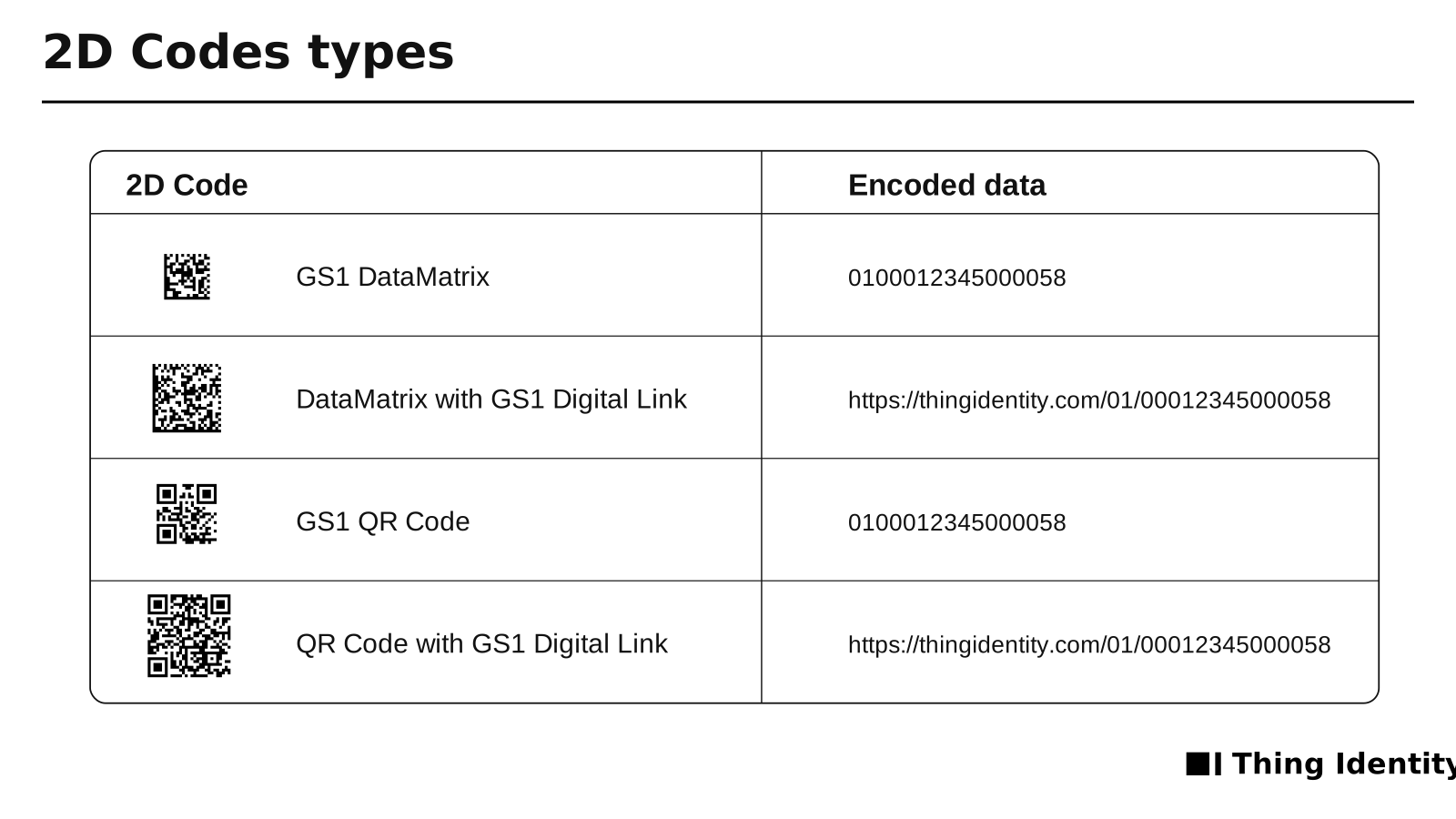
Four types of 2D codes.
You make two choices: the code type and how the data is encoded. Both determine whether the code will work on a phone, at the checkout, and in your company’s systems.
The short answer: which 2D code should you choose?
If the code is intended for consumers, choose a QR Code with GS1 Digital Link. Any smartphone can scan it.
If you need a small code for an industry process, choose GS1 DataMatrix. It is used in healthcare, among other sectors. It contains identifiers and additional GS1 data, but it is not a link to a website.
If you need a small code that contains a URL, choose DataMatrix with GS1 Digital Link. First check whether your recipients’ devices can read Data Matrix codes. Most smartphones do not recognize them.
Choose GS1 QR Code only when a specific standard or system requires it. Current GS1 retail guidelines focus on GS1 DataMatrix, QR Code with GS1 Digital Link, and DataMatrix with GS1 Digital Link.
Code type and data encoding
The names of 2D codes combine two separate pieces of information.
The code type defines its structure and appearance. Here, the choice is between QR Code and Data Matrix.
The data encoding method determines how a device reads the contents. The GS1 system uses two options:
- A GS1 element string uses GS1 Application Identifiers (AIs). A human-readable example looks like this:
(01)09526064055028(10)ABC123. The(01)field contains the Global Trade Item Number (GTIN). The parentheses make the data easier to read, but they are not encoded in the symbol. - GS1 Digital Link encodes the same identifiers as a web address, for example
https://example.com/01/09526064055028/10/ABC123.
The first option provides structured product data. The second serves as both a product identifier and a link to additional information online.
GS1 QR Code: structured data without a direct link
A GS1 QR Code is a QR Code containing a GS1 element string, such as a GTIN, lot number, or expiration date.
It does not contain a web address, so it does not lead directly to the product website. A specialized app can read the GTIN and look up related information, but a standard phone camera will not open a webpage.
GS1 QR Code and QR Code with GS1 Digital Link are not the same. If you are implementing a new code in retail, check the requirements of your process. Current GS1 guidelines for retail point-of-sale describe three other 2D code options and do not identify GS1 QR Code as the primary solution.
When should you consider GS1 QR Code?
Only when a specific industry standard or an existing system requires it. For consumers, choose QR Code with GS1 Digital Link.
QR Code with GS1 Digital Link: one code for the product and the web
This is a standard QR Code containing an address that follows the GS1 Digital Link standard. The address includes a GS1 key, usually a GTIN, and may contain additional data.
The same code works in your company’s system and on a smartphone. The system reads the product identifier, while the consumer opens a webpage.
The address in the code stays the same, but you can change the page it leads to. This lets you update instructions, an e-label, or recycling information without reprinting the packaging.
A GS1 Digital Link resolver can connect one address to different types of product information, including:
- a product detail page,
- a user manual,
- an e-label,
- certificates,
- repair and recycling information,
- a Digital Product Passport.
Any smartphone can scan a QR Code. Users do not need to know what a GTIN is or install a specialized app.
GS1 DataMatrix: a small code for industry processes
GS1 DataMatrix contains a GS1 element string, such as a GTIN, lot number, expiration date, or serial number.
Its main advantage is its small size. Data Matrix can hold a large amount of data in a small area and is also available in a rectangular format. This makes it suitable for narrow labels and small items.
GS1 DataMatrix is used in healthcare, on medical devices, in logistics, and wherever a batch or individual item must be identified. If an industry standard requires this code, do not replace it with another code simply because it looks better in the design.
The code is not a web address, so scanning it with a phone camera will not open the product website.
DataMatrix with GS1 Digital Link: a small code with a web address
This Data Matrix code contains a GS1 Digital Link address. It is not a GS1 DataMatrix with a GS1 element string, but a standard Data Matrix containing a link.
This code:
- usually takes up less space than a QR Code with the same content,
- can lead to a website.
Not every smartphone can read Data Matrix codes. Some phones will open the link, while others require a separate app.
Choose DataMatrix with GS1 Digital Link when space is limited and you know which devices will scan it. If the code is intended for consumers, QR Code with GS1 Digital Link is the simpler choice.
Key differences in practice
Scanning with a smartphone
If consumers will scan the code, choose QR Code with GS1 Digital Link. The phone camera will recognize the link and offer to open it.
DataMatrix with GS1 Digital Link works in the same way only on devices that support Data Matrix. GS1 DataMatrix requires an app that understands GS1 data. A phone may read a GS1 QR Code, but it will not find a direct link to a webpage in the code.
Space on the packaging
GS1 DataMatrix usually takes up the least space among the codes approved for retail point-of-sale. DataMatrix with GS1 Digital Link can also be smaller than a QR Code. The exact size depends on the amount of data, the module size, and print quality.
A QR Code requires a quiet zone of at least four modules on each side. Data Matrix usually requires one module. See our detailed guide to placing 2D codes on packaging.
Point-of-sale processing
Scanning a 2D code is only the first step. The point-of-sale system must also understand the encoded data and read the GTIN correctly.
GS1’s 2027 ambition is for retail point-of-sale systems worldwide to read GTINs from both linear barcodes and 2D codes by the end of 2027. This does not mean that every company must remove EAN/UPC barcodes in 2027.
During the transition, many products will still need a linear barcode alongside the 2D code. Before removing it, confirm that your trading partners are ready.
Changing content after printing
Once a code has been printed, you cannot change the data stored in it.
GS1 Digital Link does, however, let you change the redirect or webpage content without changing the printed code.
Which code should you choose for your product?
Consumer products
For food, cosmetics, electronics, clothing, and household products, choose QR Code with GS1 Digital Link. Consumers can scan it with their phones, and the same code can also identify the product at the checkout.
Pharmaceuticals and medical devices
Pharmaceuticals and medical devices use GS1 DataMatrix in accordance with applicable regulations and identification processes.
Small products and labels
If you need identification without a link to a website, choose GS1 DataMatrix. If the code must lead to a webpage, choose DataMatrix with GS1 Digital Link. Test it on the devices your recipients will use.
Logistics and closed B2B processes
In a closed business-to-business process, compatibility with existing scanners matters more than smartphone support. Choose the code required by the process and its data. This will often be GS1 DataMatrix.
Digital Product Passport
A QR Code with GS1 Digital Link can lead to a Digital Product Passport. Choosing this code alone does not guarantee regulatory compliance. Requirements for the code, data, and system depend on the product category and applicable laws.
Can one 2D code replace EAN-13?
First confirm three things:
- Can all key trading partners read the selected 2D code?
- Can their systems process the GTIN and additional data?
- Do local industry requirements allow you to use only this data carrier?
If the answer to any question is “no,” keep the linear barcode for now. Place both codes in accordance with GS1 guidelines.
How do you generate and test a 2D code?
Start with what the code needs to do, not how it looks.
- Identify who will scan the code: a consumer, cashier, warehouse worker, or service technician.
- Choose the GS1 key. For a product, this will usually be the GTIN.
- Add only the data you need, such as a lot number or serial number.
- Choose how to encode the data: a GS1 element string or GS1 Digital Link.
- Select QR Code or Data Matrix based on the available space and your recipients’ devices.
- Generate the code at the correct size and preserve the quiet zone.
- Test the finished print, not just the image on a screen.
The Thing Identity 2D code generator lets you create a QR Code or Data Matrix with GS1 Digital Link. Enter the GTIN and any additional data you need, then download the finished code for your packaging design.
Test the code on different phones and scanners and on the material where it will be printed. Account for varnish, packaging curvature, and lighting conditions. If the code must work at the checkout, verify it with your trading partner or local GS1 organization.
Frequently asked questions
Summary
For consumer products, choose QR Code with GS1 Digital Link. It identifies the product, links to information online, and can be scanned with a smartphone.
Choose GS1 DataMatrix when an industry process requires it or when space is very limited. Choose DataMatrix with GS1 Digital Link when you need a link in a small code and know which devices will scan it.
Do not base your decision on size alone. First decide who will scan the code, which device they will use, and how they will use the data. Then choose the code type and how the data is encoded.
Need help choosing a code for your product line? Schedule a free consultation.
Official GS1 resources
Read next
- 2D codes on packaging and the new SEO: product visibility in the AI eraA practical guide for manufacturers and brands: how a 2D code with GS1 Digital Link connects a physical product with structured data that supports SEO and AI answers.
- Where to print 2D barcodes on packagingHow to position a GS1 Digital Link QR Code or Data Matrix relative to an EAN barcode, preserve quiet zones, and design packaging with POS and consumer codes.
- GS1 Digital LinkGS1 Digital Link - the code that's reshaping product manufacturing.
- E-LabelE-Label - wine labelling is going digital.
- Digital Product PassportWhat is a digital product passport?